
Documents Accepted by Stake.com for Proof of Identity in India
20 Nov 2025Read More
How to Use Passkeys on Stake.com
- What are passkeys on Stake.com
- How to set-up passkeys on Stake
- Benefits of using passkeys
- How to Use Passkeys on Stake.com
- What Is a Passkey?
- Why Use a Passkey on Stake?
- How to Set Up a Passkey on Stake.com
Keep your Stake account secure by using a passkey rather than a traditional password. This article guides you through the steps to set up your first passkey on Stake.com.
How to Use Passkeys on Stake.com
It is always Stake.com's top priority to keep your account safe. With passkeys, players can now log in securely without using traditional passwords or email verification codes. This modern authentication method combines strong encryption with simple, one-tap access.
What Is a Passkey?
A passkey is a next-generation sign-in method developed by Apple, Google, Microsoft, and the FIDO Alliance.
Instead of entering a password, your passkey uses a unique, device-based cryptographic key to verify your identity. You simply unlock your device using your fingerprint, Face ID, or PIN — and you’re in.
Because passkeys are stored securely on your device, they can’t be guessed, stolen, or phished.
Why Use a Passkey on Stake?
Passkeys eliminate the weaknesses of traditional login systems. Key benefits include:
- Enhanced protection: Passkeys can’t be reused or guessed.
- Phishing resistance: Only the official Stake.com domain can trigger your passkey.
- Device-level security: Your login works only when your device is nearby.
- Effortless login: No need to remember complex passwords.
- Speed and convenience: Unlock your Stake account instantly with biometrics or a PIN.
How to Set Up a Passkey on Stake.com
Follow these steps to create your first passkey on Stake.com:
- Log in to your Stake.com account.
- Navigate to Account Settings → Security.
- Scroll down the page until you find Passkeys.
- Click Create Passkey.
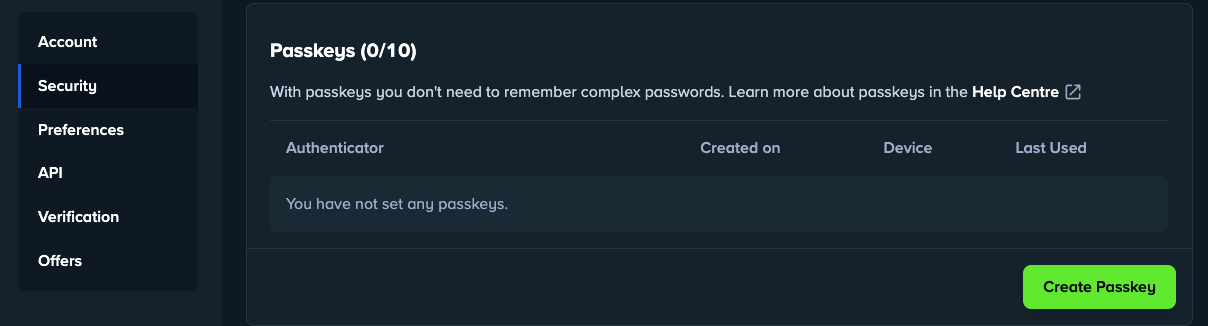
Once complete, your passkey will let you access Stake.com without passwords, emails, or 2FA codes.
If you use multiple devices, you can sync your passkey via iCloud Keychain (Apple) or Google Password Manager, allowing you to log in seamlessly wherever you play.
Passkeys are a safer, faster, and more convenient way to access your Stake.com account. They protect against phishing, remove the need for passwords, and use your device’s built-in security to keep your account safe.
What is a passkey on Stake.com?
A passkey is a password-free login method that uses cryptographic authentication tied to your device. You can sign in to Stake.com using biometrics like fingerprint or Face ID, or your device PIN, without needing a traditional password.
How do I set up a passkey on Stake.com?
To set up a passkey, log in to your Stake.com account, go to Account Settings > Security, select Create Passkey, and follow the setup prompts. Once added, you can log in securely without entering a password.
Are passkeys safer than passwords?
Yes. Passkeys are stored locally on your device and verified through biometrics or PIN, making them immune to phishing and data breaches. They’re generated using public-key cryptography, so your private data never leaves your device.
Can I use my passkey on multiple devices?
Yes. You can sync your passkey across devices using iCloud Keychain or Google Password Manager, allowing you to log in to Stake.com securely on any synced device.
- Select All
- American Football Events
- Baseball Events
- Basketball Events
- Boxing/MMA Events
- Casino Live Dealer Events
- Casino Promotion Events
- Casino Roulette Tournaments Events
- Casino Slots Tournaments Events
- Cricket Events
- Esports Events
- Football Events
- Formula 1 Events
- Poker Events
- Soccer Events
- Tennis Events
Sports Events
Starts in
Latest News
-
 Proof of ID - India
 -
Proof of ID NigeriaAccepted Documents for Proof of Identity on Stake.com For Players in Nigeria12 Nov 2025Read More
-
Proof of ID JapanAccepted Documents for Proof of Identity on Stake.com for Players in Japan12 Nov 2025Read More
-
Reset 2FAReset Stake 2FA | Cannot Access Two-Factor Authentication08 Nov 2025Read More