
Documents Accepted by Stake.com for Proof of Identity in India
20 Nov 2025Διαβάστε περισσότερα
How To Reset Your Stake.com Password
- Importance of verifying your email address on Stake.com
- How to reset your Stake password

Don't miss out on a bet through a forgotten password. This article explains how to recover your password and create a new one in only a few seconds.
With so many passwords scattered across different accounts, it’s no surprise that we forget some of them from time to time. If you forget your Stake.com password, it’s quick and easy to reset it so that you can access your account.
Please note that you must verify your email before you can reset your password.
- Go to Stake.com and click the Sign In button.
- At the bottom of the sign-in form, click Forgot Password.
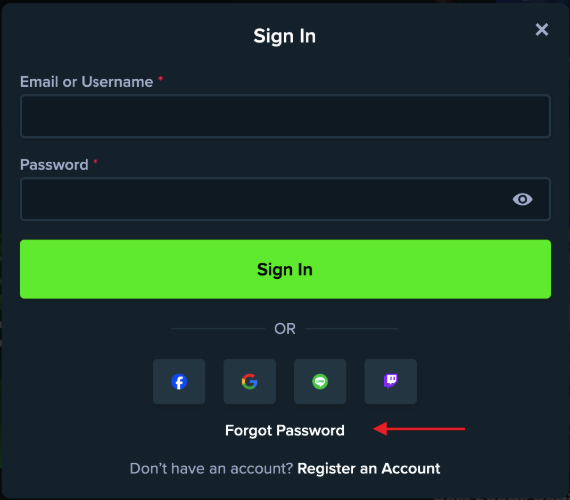
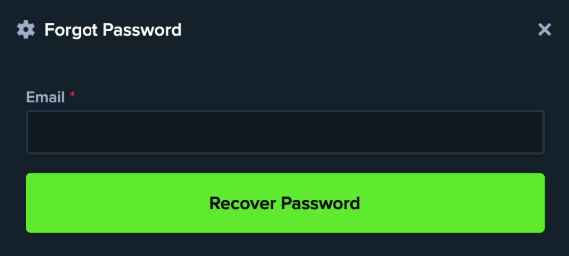
- Enter the verified email address that’s linked to your Stake account and click Recover Password.
- Open the Reset Password email from Stake in your email.
- Click the link in the email and set a new password.
- Go back to the Stake Sign In form, enter your username and the new password to access your account.
If, for any reason, you still cannot access your account after this, contact Stake customer support for assistance.
Furthermore, players who signed up via Google, Facebook, Line, or Twitch need to reset the password on the platform they used, not with Stake.com.
Δείτε επίσης
- Reset Stake 2FA | Cannot Access Two-Factor Authentication
- Store Your Funds in the Stake.com Vault
- How To Set Up Two-Factor Authentication (2FA)
- Solving Lost Access to Verified Stake.com Email Account
- How To Verify Your Email
- What Documents are Accepted for Proof of Identity?
- How to Deposit at Stake.com
- Επιλογή όλων
- American Football Events
- Baseball Events
- Basketball Events
- Boxing/MMA Events
- Casino Live Dealer Events
- Casino Promotion Events
- Casino Roulette Tournaments Events
- Casino Slots Tournaments Events
- Cricket Events
- Esports Events
- Football Events
- Formula 1 Events
- Poker Events
- Soccer Events
- Tennis Events
Εκδηλώσεις καζίνο
Ξεκινά μέσα
Τελευταία νέα
-
 Proof of ID - India
 -
Proof of ID NigeriaAccepted Documents for Proof of Identity on Stake.com For Players in Nigeria12 Nov 2025Διαβάστε περισσότερα
-
Proof of ID JapanAccepted Documents for Proof of Identity on Stake.com for Players in Japan12 Nov 2025Διαβάστε περισσότερα
-
Reset 2FAReset Stake 2FA | Cannot Access Two-Factor Authentication08 Nov 2025Διαβάστε περισσότερα
-
Set-Up PasskeysHow to Use Passkeys on Stake.com07 Nov 2025Διαβάστε περισσότερα